- Jerin Antony
- December 11, 2025
Real-Time Human Intrusion Detection in Secured Zones
In today’s heightened security environments—be it airports, terminals, airside zones or critical infrastructure—unauthorised human access is a major risk. In this blog we present an end-to-end solution for human intrusion detection using the NVIDIA Software Stack (DeepStream SDK) that monitors multiple camera feeds, configures restricted zones, displays real-time bounding boxes and raises alarms when someone enters those zones. This solution works at the Edge as well as pushes events to the Cloud for dashboarding and further analytics.
Why human intrusion detection matters
Imagine a restricted airside zone or terminal zone where only authorised staff should enter. An intruder crossing into that zone unnoticed can cause safety incidents or security breaches. Traditional CCTV monitoring relies on human presence, which is error-prone and costly. An automated system that:
- Defines monitored zones,
- Continuously monitors multiple camera feeds,
- Instantly detects a human entering a zone,
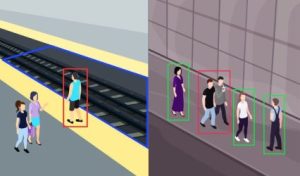
- Displays visual alert (e.g., red bounding box), and
- Raises an alarm/notification
…adds enormous value in enhancing situational awareness and response time.
Research and industry trends show that video-based analytics are increasingly being used to detect unauthorized access in critical zones.
By deploying this with Edge/Cloud architectures you can scale across many cameras, many locations, and manage detection centrally.
System Overview: What the solution does

Here is a breakdown of how the system works and what features it supports:
1. Camera feeds & zone configuration
- The system supports multiple camera feeds (using protocols such as RTSP) running live video streams into the pipeline.
- An operator configures restricted zone(s) within each camera’s field-of-view. For example: “Zone A: airside baggage area”, “Zone B: terminal maintenance corridor”.
- The restricted zone is typically defined via a polygon overlay or axis-aligned rectangle on the video UI. Only human detections inside that zone trigger alerts.
2. Human detection & bounding boxes
- The core vision pipeline uses NVIDIA DeepStream SDK which is designed for high-throughput object detection on the Edge.
- Because DeepStream is optimised for multiple streams and real-time analytics, you can run many camera feeds on a GPU/Edge device.
3. Alarm/alert generation
- When a human enters the restricted zone, the system triggers an alarm: this could be a local audio/visual beacon, SMS/Email notification, mobile push, or integration into a Security Operations Centre (SOC) dashboard.
- The alarm is configurable: e.g., threshold delay (human dwell-time > X seconds), zone priority (zone “A” vs zone “B”), camera grouping etc.
4. Edge processing + Cloud dashboard
- The detection and bounding-box overlay happen on the Edge (on-premise device) enabling minimal latency and local response.
- The system then pushes events and video metadata to a Cloud service (AWS/Azure/GCP or private cloud). This enables centralised monitoring, historical analytics, audit trail, alerts across multiple sites.
- The Cloud dashboard shows live camera status, intrusion events, heat-maps, zone-violation statistics, ROI graphs etc.
Technical Architecture
Let’s break down the architecture into layers:
1. Camera & Ingestion Layer
- IP/RTSP/H.264 streams from multiple cameras.
- Each video feed corresponds to a configured zone (or multiple zones).
- Edge device (e.g., NVIDIA Jetson, GPU-server) runs the DeepStream pipeline.
2. Inference & Zone Logic Layer
- DeepStream SDK handles decoding, inference (person detection), tracking, metadata generation.
- A zone-logic module evaluates:
- Is person bounding box inside polygon region?
- Has the person remained longer than threshold?
- If yes → trigger alarm and markup (red bounding box).
- The output includes video overlay, bounding boxes, event metadata (cameraID, zoneID, timestamp, bounding box coordinates, duration).
3. Alerting & Edge Actions Layer
- On intrusion: play sound, flash a light, send edge alert, annotate video.
- Optionally capture snapshot image and send for further review.
4. Cloud Integration & Dashboard Layer
- Edge device sends event metadata (and optionally video/frame snapshots) via MQTT/REST to cloud.
- Cloud database aggregates events from multiple sites/cameras.
- Dashboard provides live map of cameras, real-time alerts, historical analytics (violations per zone, most-frequently triggered cameras, average response time).
- Alerts can trigger workflows: email to security teams, SMS, mobile app notifications.
5. Management & Configuration Layer
- UI for zone configuration per camera, alarm thresholds, camera grouping, user roles, dashboard credentials.
- Logging, audit trail, secure user access, firmware updates for Edge device.
Use-Case Example: Airport Airside & Terminal Zones
Here’s a scenario specifically for airport security:
- Zones:
- Zone A: Airside ramp access (only authorised ground staff).
- Zone B: Maintenance corridor in terminal (no general public).
- Cameras: Multiple PTZ and fixed cameras cover these zones.
- Workflow:
- A person enters Zone A from an unauthorised gate.
- The system detects the person bounding box crossing into polygon region; box turns red.
- An alarm is generated: local beacon flashes + audio, and an event is sent to cloud.
- Security dashboard receives the event; an operator views live camera feed, identifies intruder (via snapshot) and dispatches security team.
- Analytics show that this camera has had repeated violations → triggers review of physical access controls at that location.
Benefits:- Instant detection & response.
- Centralised monitoring of multiple sites (airside, terminal, cargo).
- Historical analytics for security audits and trend spotting.
- Edge processing means minimal latency and less bandwidth.
- Zones:
Implementation Best Practices
To achieve reliable human intrusion detection, consider these guidelines:
- Camera quality and placement: Use sufficient resolution, ensure lighting (day/night), avoid heavy occlusion.
- Zone configuration accuracy: Precisely map restricted region—polygon overlay should align with the real-world zone. Misalignment may cause false alarms.
- Threshold tuning: Decide when to trigger an alarm (immediate entry vs lingering). Too fast → many false positives; too slow → delay response.
- Edge device sizing: Use a GPU/Edge device capable of processing multiple camera feeds. DeepStream is optimised for many streams.
- Model selection / inference accuracy: Use a person-detection model that works for your environment (lighting, crowd density, camera angle).
- False-alarm mitigation: Implement tracking so that only persons staying or moving inside zone trigger alarm (not passers-by just brushing the zone).
- Cloud integration: Securely connect Edge to Cloud, ensure event metadata is reliably sent, design dashboard for actionable insights.
- Operational workflow: Define what happens when alert triggers: which teams get notified, how video is archived, how incident is logged.
- Privacy and compliance: Ensure video analytics use complies with local privacy/security regulations (especially in public or terminal zones).
- Testing and calibration: Run pilot, check false positive/false negative rates, calibrate zone definitions, thresholds, camera angles.
Advantages of Using NVIDIA Software Stack (DeepStream SDK)
Leveraging NVIDIA Software Stack (DeepStream SDK) offers several strong advantages for this solution:
- High throughput: DeepStream can ingest, decode, and perform inference on multiple 1080p @ 30 fps streams with excellent performance.
- Flexibility: Supports custom person-detection models, tracking, plugins and metadata pipelines.
- Edge-friendly: Can be deployed on Jetson Xavier/Orin or GPU servers enabling on-premises, low-latency processing.
- Scalability: The same architecture can scale from one camera to hundreds across sites, with Cloud aggregation.
- Rich ecosystem: DeepStream supports GStreamer, CUDA, TensorRT optimisations – enabling real-time, efficient inference.
- Proven in similar domains: For example, DeepStream was used for a human pose estimation pipeline.
Challenges and How to Address Them
No system is without challenges—here are some you may encounter and how to mitigate:
- Lighting and weather conditions: Poor lighting or harsh shadows can degrade detection. Use IR/low-light capable cameras, adjust the model.
- Camera angle & occlusion: If humans are partly hidden or camera view is blocked, detections may fail. Require good placement and maybe multiple overlapping cameras.
- Crowded zones & groups: In heavy traffic areas, many people may pass through; you need logic to avoid overwhelming alerts. Use grouping/tracking logic to suppress duplicates.
- False alarms: Pets, equipment, trolleys can sometimes be detected as persons; train/tune model accordingly, apply size/shape filters.
- Latency & bandwidth: Pushing large video streams to cloud may overload networks; rely on Edge processing and only send metadata or snapshots.
- Maintenance & calibration: Over time camera alignment may drift, or zone definitions become outdated; schedule periodic reviews.
- Integration with operations: The technical system is only half the task—the security team must have defined processes to act on alerts quickly.
Future Enhancements
Once basic intrusion detection is operational, you can extend capabilities:
- Person re-identification (ReID): Recognise if a known authorised person enters; flag unknown/unrecognised persons.
- Behaviour analytics: Detect loitering, tail-gating, suspicious motion inside the zone rather than just entry.
- Multi-zone correlation: Link movement across cameras – e.g., someone enters Zone A then moves to Zone B → raise higher-level alert.
- Edge-Cloud AI model updates: Use cloud data to retrain/tune detection models and deploy updates to Edge devices.
- Integration with access control systems: If a badge-swipe fails but person still enters zone, system raises intrusion.
- Heat-map analytics & risk scoring: Dashboard shows frequent intrusion zones, time-of-day patterns, allows preventive actions.
Conclusion
Automated human intrusion detection in restricted airside/terminal zones is no longer a futuristic idea—it’s a practical, scalable solution with today’s Edge-AI and video analytics platforms. By leveraging the deep-learning enabled architecture of NVIDIA Software Stack (DeepStream SDK), and combining carefully defined zones, multiple camera feeds, real-time bounding-box alarms, and cloud-based dashboards, organisations can dramatically enhance their security posture.
Key take-aways:
- Define zones accurately and configure system parameters (thresholds, camera feeds).
- Use robust person detection and tracking on the Edge for minimal latency.
- Trigger a red bounding box + alarm when intrusion is detected inside the zone.
- Push events to the Cloud for central monitoring, analytics and forensic review.
- Ensure operational workflows are in place so alerts lead to rapid action.
- Periodically calibrate, maintain and improve the system via data analytics and feedback.
With this approach, security teams gain real-time awareness, automated response, and centralised oversight — significantly reducing the time between intrusion and reaction, lowering risk exposure, and enabling smarter resource deployment.
Contact Us
We're here to help! Reach out to us with any questions or inquiries.